
 eSIM Studios
In iOS 26, Apple Intelligence makes the Wallet app's order tracking feature genuinely useful by scanning your email for shipping details.
 The ability to track orders in Apple Wallet isn't new – it's actually been around since iOS 16. But if you've never noticed it before, don't worry. Most people haven't used it either.
The feature initially struggled because it relied on merchants to actively support it, but not many bothered. In fact, despite being available for years, order tracking in Apple's Wallet app remained largely unused. But there's a decent chance iOS 26 will change all that.
Order Tracking Meets Apple IntelligenceIn iOS 26, Apple Intelligence now scans your emails to automatically extract order tracking information. This means virtually any online purchase that generates a confirmation email can now appear in the Wallet app.
The on-device AI identifies shipping details from emails sent by merchants or delivery carriers, then consolidates everything in the Wallet app's Order Tracking page.
Just note that you'll need an iPhone 15 Pro, iPhone 16, iPhone 17, or iPhone Air to access the improved order tracking, since Apple Intelligence isn't available on older devices.
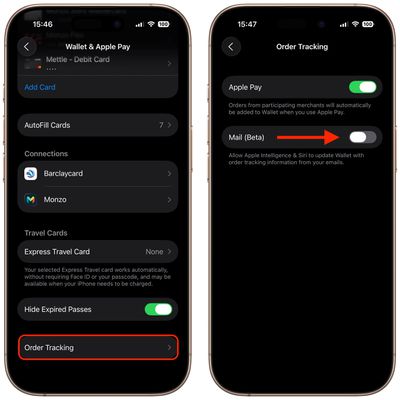
Enabling Order Tracking in SettingsYou can enable the AI-enhanced order tracking feature in the following way:

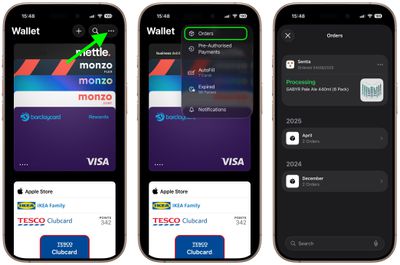

Your orders appear with merchant details, order status, and tracking information when available. You can tap individual orders to see more detailed tracking information and shipping updates, as well as mark the order as complete, mute notifications, or delete the order.
The revamped order tracking finally delivers on Wallet's promise as a centralized hub for purchase information. Surprisingly, it just took Apple Intelligence to make it work properly.

No comments