
 eSIM Studios
When macOS Tahoe and iPadOS 26 launched last September, Apple quietly removed Safari's Compact tab layout – the option that merged the address bar and the tab bar into a single, space-saving row. If you were a fan of it, you will have been out of luck for months.
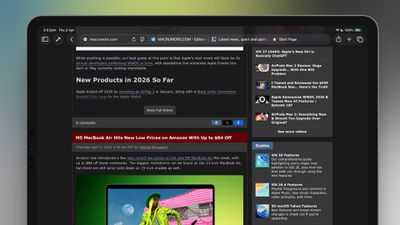 The good news is that Apple has brought it back. In macOS 26.4 and iPadOS 26.4, the Compact tab bar is once again available as an alternative to the default Separate layout. Here's how to enable it on both platforms.
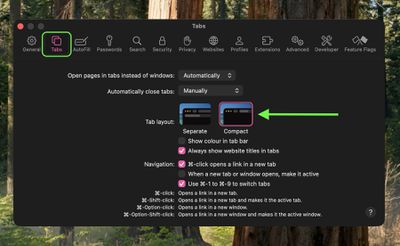
The address bar and tab bar will immediately merge into a single row, freeing up vertical screen space.
On iPad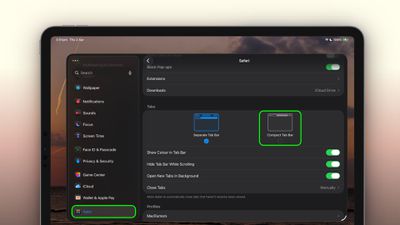
That's all there is to it. If you decide you prefer the standard layout, simply retrace your steps and select Separate (on Mac) or Separate Tab Bar (on iPad).
The Compact layout can be handy on the smaller screens of the MacBook Air or iPad mini, where every pixel of vertical space counts. It's worth trying if you've never used it, just be aware that tab titles are truncated more aggressively in this view, so when switching between many open tabs you'll have to rely more on favicons than on page names.

No comments